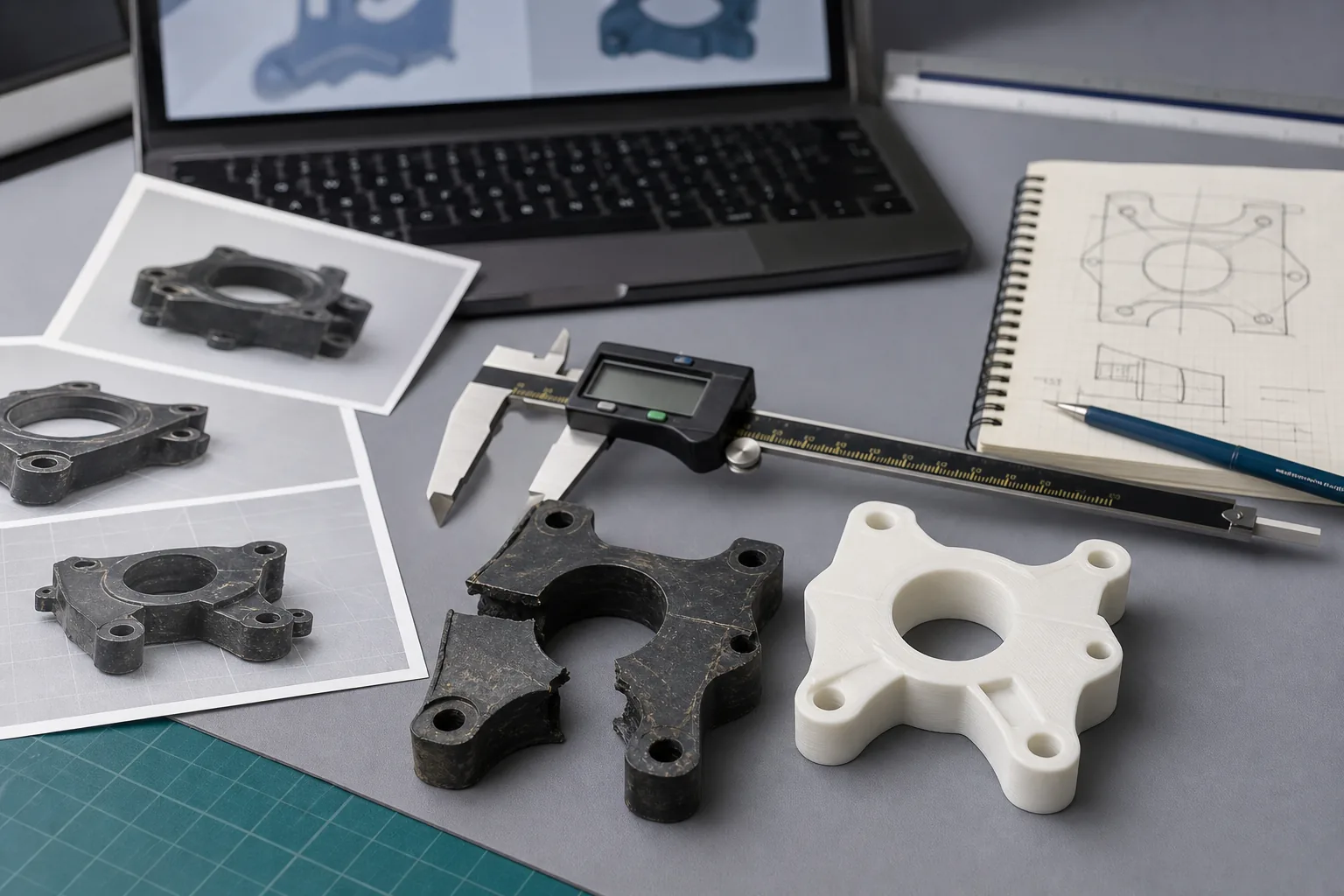
Use multiple angles, close-ups of holes/clips, and one scale reference.
3D print from a photo
Start a replacement part from a photo or sample.
A photo can explain the part, but a 3D printer still needs geometry. If you do not have an STL or STEP file yet, photos, measurements, a broken sample, and use notes can support a paid modeling estimate. CAD work is scoped and priced for approval before it begins.
Print-ready STL, STEP, or STP files. CAD repair or model creation is paid work and priced before it begins.
Photos help explain the shape and use case, but dimensions and modeling are what turn the idea into a printable part.
01
Photo helps
Good photos show shape, damage, mounting, and where the part fits.
02
Dimensions matter
Measurements turn a picture into something that can actually fit.
03
File still needed
A printable STL or STEP model must exist before instant quoting.
04
Modeling estimate
If you only have photos, sketches, or a broken sample, request a paid CAD estimate before production quoting.
Capture overall size, hole spacing, wall thickness, mating faces, and critical clearances.
Modeling or file-prep work is quoted separately and begins only after you approve the scope and price.
What photos can do
Where photos help before a custom part order
Photos are useful context. They can show the broken area, the assembly the part belongs to, the direction of load, and the features that may need extra attention.
Cracks, missing tabs, worn holes, broken clips, and missing corners are easier to discuss visually.
Photos of the surrounding assembly show what the replacement part touches.
A clear set of photos helps decide whether the job is worth modeling before quoting.
What photos cannot do alone
Why a printable model still has to exist
A photo by itself does not provide reliable scale, hidden geometry, wall thickness, or exact mating details. That is why dimensions, CAD, scanning, or modeling are usually part of the process.
- 01Overall length, width, height, and thickness
- 02Hole sizes and spacing between centers
- 03Back-side features, clips, tabs, pockets, bosses, and mating surfaces
- 04Use-case notes like heat, load, vibration, or outdoor exposure
Best next step
When to upload a file vs. request a modeling estimate
Use the instant quote flow when you already have a printable file. Request a paid CAD estimate when you only have photos, a broken sample, or a sketch. Production pricing follows after printable geometry exists.
Best when you already have STL, STEP, or STP geometry.
Best when the job needs model creation, repair, or file preparation before it can be quoted for production.
Photos, measurements, and use-case notes make the first review far more useful.
Photo checklist
What makes a photo-based request easier to evaluate
Treat the photos like documentation, not just pictures. The goal is to reveal the shape, the scale, and the reason the part matters.
Send front, back, side, bottom, installed, and close-up views so hidden features are less likely to be missed.
Include calipers, a ruler, or a known object, then add actual measurements for critical features.
Show broken tabs, cracked bosses, worn holes, or missing corners so the replacement can be designed around the real weak spot.
Before ordering
Quick decision guide.
- Strong use
- You have photos plus dimensions, a broken sample, or enough geometry for a replacement model.
- Needs care
- Hidden features, exact snap fits, fine cosmetic surfaces, high heat, or safety-critical use.
- Send first
- Multiple photos, key measurements, scale reference, how the part is used, and whether a CAD file exists.
FAQ
Common questions before ordering.
Can a photo be converted directly into a 3D print?
Usually not by itself. A printable model needs real geometry and dimensions, but photos are useful for review and modeling discussions.
What photos should I send?
Send front, back, side, close-up, and installed-context photos, especially around holes, clips, and mating features.
Should I upload to the quote flow or ask for help?
Upload when you already have STL, STEP, or STP files. Ask for help first when you only have photos, sketches, or a broken sample.
Can you quote from photos alone?
Photos alone are usually not enough for an instant production quote because the part still needs printable geometry and reliable dimensions.
What if I have a rough sketch instead of CAD?
A sketch can help explain the concept, but dimensions, fit notes, and review are still needed before a printable file can be ordered.
Does CAD modeling cost extra?
Yes. CAD repair, reverse engineering, and model creation are separate paid services. BuildplateCo sends a scope and price for approval before design work begins.
Upload the file.
We’ll check the practical limits.
Review pricing before checkout, or request a scope review when the design still needs work. Any CAD work is separately priced before it begins.